
Target flow: the record is captured for you
Meetings come from the calendar and matching ones get transcribed, so nobody has to take notes.
We use Google Analytics and Microsoft Clarity only with your explicit consent to measure site usage and improve the experience. Declining does not affect the site or signup. Privacy policy
Decisions reopening for debate a week later is a note-taking problem; half the participants not remembering the meeting at all is a record problem. This page covers where meeting output disappears and how it is tied to a record in the WApps business management ecosystem.

Definition
Meeting notes and action tracking mean turning what was said into a written record and turning decisions into work items with an owner and a date. The point of the record is accountability rather than archival: a week later, “what did we decide” is answered from the record instead of from memory. If note-taking keeps one person from participating, the process is already broken.
Problem and approach
The person who most needs to speak ends up outside the discussion because they are stuck taking notes. Notes stay in personal notebooks and never reach a shared place. A teammate who missed the meeting only finds out when someone recounts it. Decisions close without an owner attached, and the next meeting opens by relitigating the same topic.
Interactive demo
Pick a meeting, then open the summary once recording and transcription finish.
Meetings come from your calendar; the assistant joins only those matching your rule.
How it works
Meetings are picked up from your calendar, and a rule decides which ones it joins.
Participants are notified that recording started, and speech is transcribed per speaker.
What you get
Meetings come from the calendar and matching ones get transcribed, so nobody has to take notes.
The transcript is kept per speaker, so who objected to a decision can be read back later.
Flow between apps
A record created in one app carries over to the related apps on its own, so you never enter the same data twice.
Meeting recorded and summarized
Trade show to proposal
Implementation notes
Calendar connection, rule-based joining, speaker-attributed transcripts, summary and action item generation, and password-protected sharing are built into WMeet.
Three numbers are enough here: action items produced per meeting, their completion rate, and the number of topics discussed again. The third says the most: if the same topic spans two meetings, the problem is not the meeting but the follow-through.
Try it with your figures: T hours of meetings a week with K participants costs T×K person-hours. Adding back the contribution of whoever was assigned to take notes turns the value of an automatic record into a number. What matters is not the arithmetic but that every meeting is tied to a record.
Continue exploring
Next step
Decisions reopening for debate a week later is a note-taking problem; half the participants not remembering the meeting at all is a record problem. This page covers where meeting output disappears and how it is tied to a record in the WApps business management ecosystem.
A summary, key points and action items are generated and shared behind a password-protected link.
Product video · 1:50
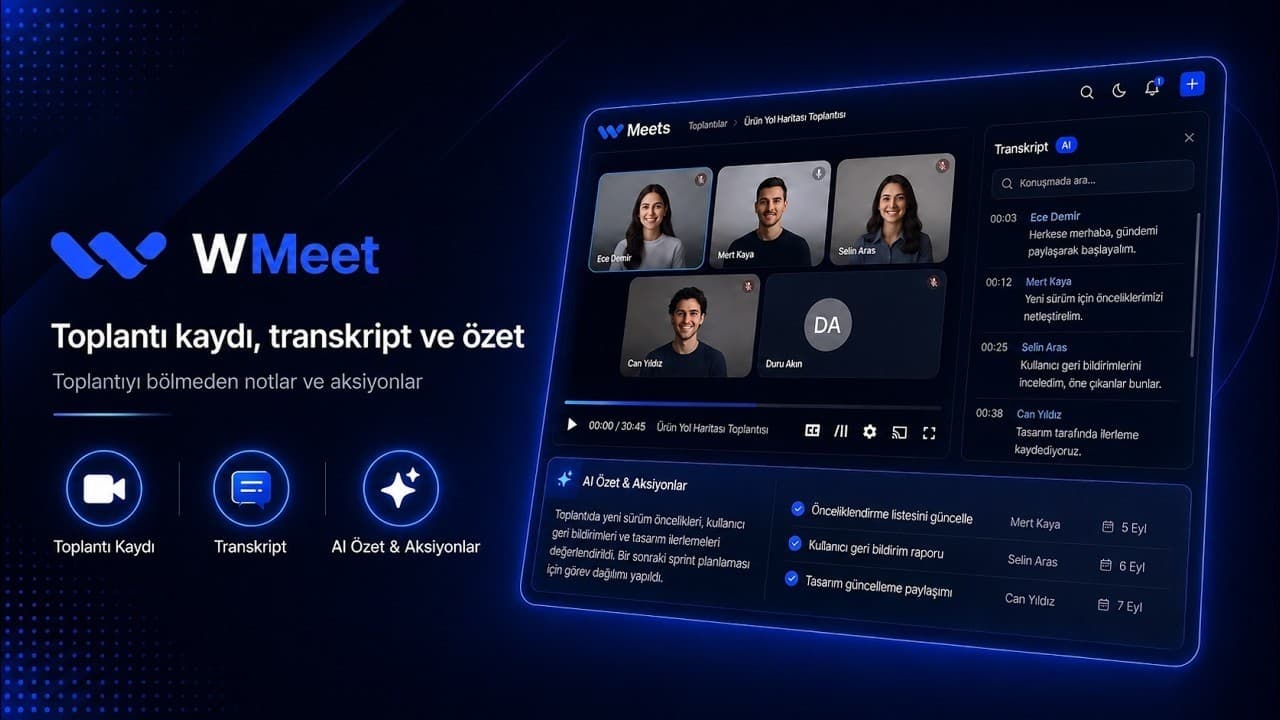 No more taking meeting notes: WMeet1:50
Action items are produced alongside the summary, each carrying an owner and a date.
The summary is shared behind a password-protected link, removing the burden of recounting the meeting.
Proposal sent · ₺120,000
Trade show to proposal
5 draft tasks created
Meeting to tasks
This flow is built with WMeet. Connect the calendar and set a rule for which meetings it joins; the assistant enters only the matching ones. Participants are notified that recording started at the beginning of the meeting — the product is not designed for covert recording. If the resulting action items are to be tracked, WTask runs in the same account.